I pin various apps to the shelf in ChromeOS for our users and for a while have wanted to pin the very useful 'Files' app. Its slightly non obvious how to do this as it's not a WebStore app as it's built into ChromeOS.
So go to the pin apps dialogue (in user settings of Chrome Management) and add a custom app:
App ID: hhaomjibdihmijegdhdafkllkbggdgoj
URL: http://clients2.google.com/service/update2/crx
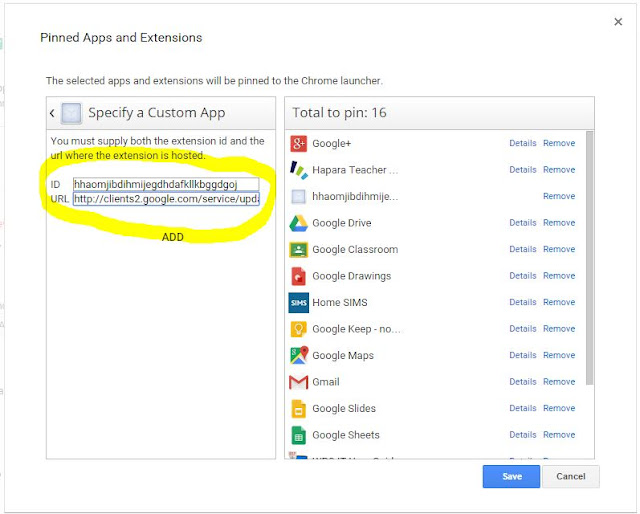
So go to the pin apps dialogue (in user settings of Chrome Management) and add a custom app:
App ID: hhaomjibdihmijegdhdafkllkbggdgoj
URL: http://clients2.google.com/service/update2/crx
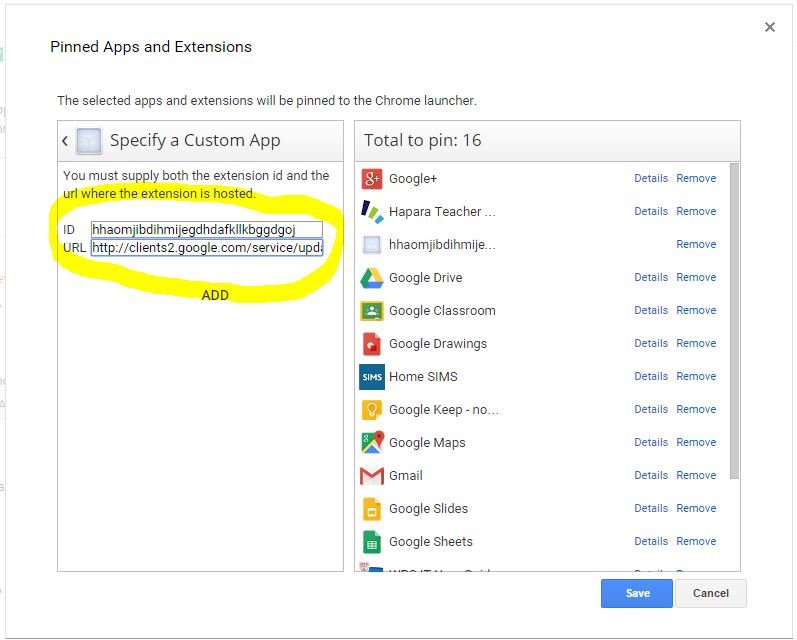
Click save and you are done.
Hi Roger,
ReplyDeleteI realize this post is quite old, but by chance do you remember how you were able to find the App ID of "Files"? I'd love to do this with some of the OS' other builtin applications such as "Shortcuts".
Thanks a bunch for sharing
-Jake
still work on october 2019. The Admin interface changed a bit, but this solution is amazing. I subscribe for Jake's question (how could you find the app ID?)
ReplyDeleteThank you!
[Keywords for italian admins: Come fissare sullo shelf l'applicazione "Files" (esplora risorse) di ChromeOS per tutti gli utenti Chromebook e chromebox dell'organizzazione G Suite].